Dive Into Our Solution
Explore the Modules of Every Product

Get Started

Prerequisites and a quick-start walkthrough for new-comers

Installation

You can install the Cumulia Framework and tools by building the source packages yourself. The package consists of the following components:
  • Cumulia ORE
  • Cumulia WUI
  • Cumulia OSA
  • Cloud service SDKs, including Cumulia Insight

Solution Overview

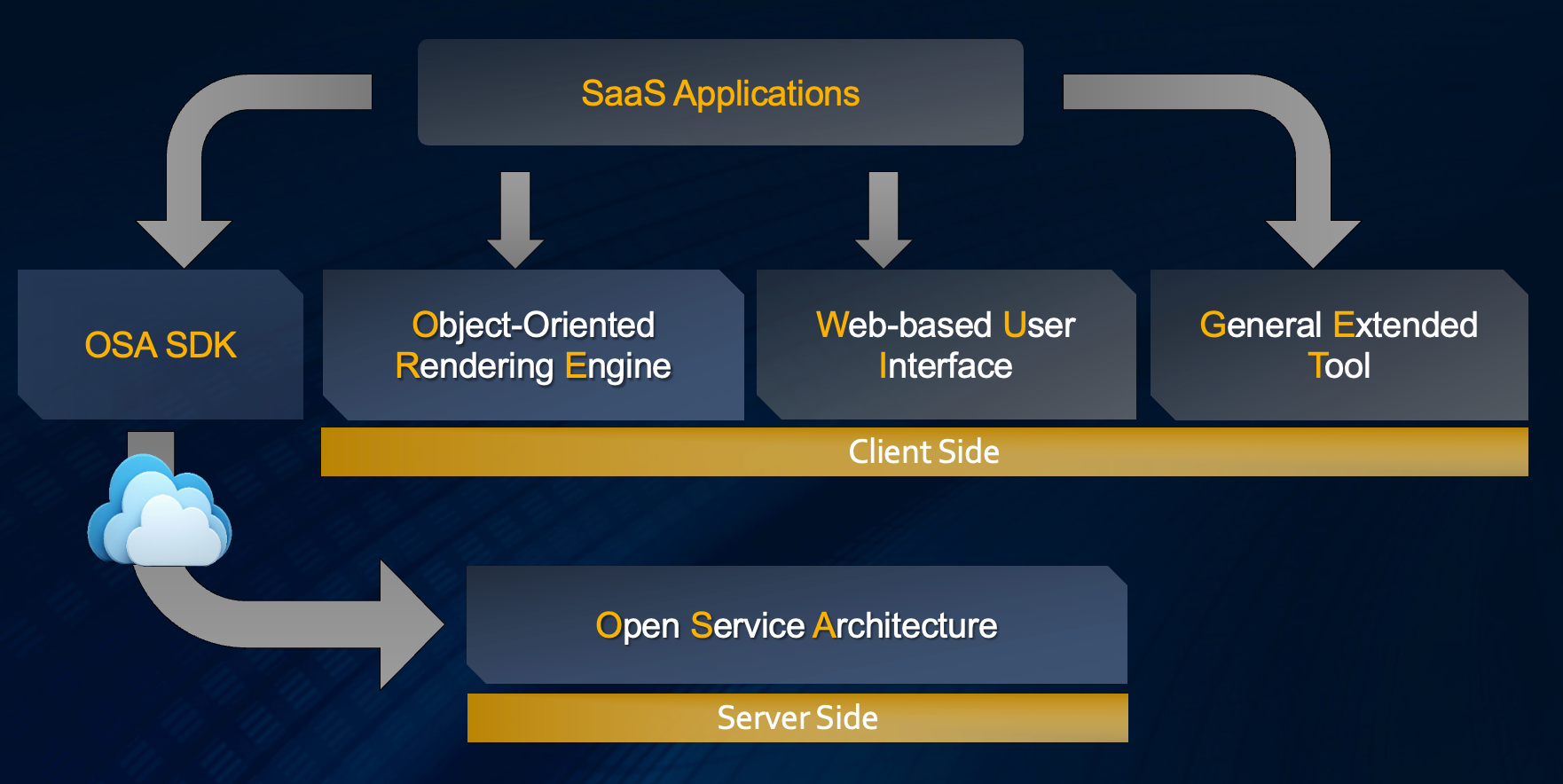
Cumulia provides a comprehensive solution for cloud-native industrial software development, addressing various challenges faced by this field. The solution comprises an open service architecture (OSA) on the cloud server side, a web-based GUI development framework (WUI), and a 3D rendering engine (ORE) on the client side.

The OSA plays a crucial role in simplifying complicated modules of industrial software and assembling them as microservices. It acts as an operating system and provides a set of system APIs based on k8s.

The ORE is specifically designed to cater to the needs of industrial software in the modeling and simulation fields. Its primary function is to render large-scale data quickly and efficiently in the browser.

The WUI delivers a modern, object-oriented development framework for large and complex web-based user interfaces of industrial software, offering a seamless and intuitive user experience.

Moreover, Cumulia offers a set of general extended toolkits. These toolkits serve as an integral component of the solution, providing enhanced functionalities for various scenarios. For example, Cumulia Insight is a notable toolkit that enables users to manipulate massive simulation data.
Platforms and Language

The Cumulia products offers commercial support for the following officially supported platforms and configurations.
  • Cumulia ORE
    • Windows, Linux, MacOS, iOS, iPadOS, and Android
    • TypeScript, JavaScript
  • Cumulia WUI
    • Windows, Linux, MacOS, iOS, iPadOS, and Android
    • TypeScript, JavaScript
  • Cumulia OSA
    • Linux/Windows system with Kubernetes on any public or private cloud cluster
    • C++, JavaScript, SQL, Python, and Go
  • Cumulia Insight
    • Linux/Windows system with Kubernetes on any public or private cloud cluster
    • Use TypeScript when implementing Insight

Create Your First Application

As a developer for your specific business, your work involves encapsulating business-related modules as microservices and implementing a business-related UI framework on the client side.

To achieve service autonomy and enable external scheduling, you need encapsulate the modularized Job-type function model as microservices. These microservices expose parameter interfaces and run in Linux containers. Additionally, you need ensure that the console output text can be pipelined to the front end.

However, encapsulating long-link services, such as geometric modeling, data analysing, and meshing, can be more complex. Each function interface within a single service requires a Web service API, which also needs to be packaged as an SDK on the front end. Furthermore, resource scheduling and stateful link issues need to be considered.

While there are no limitations on the technology stack, we should avoid using Java.

Additionally, during the development process, you need to establish a framework that closely aligns with the requirements of our business system. The framework should follows a similar maintenance architecture as desktop applications.

TypeScript will be the primary development language, and you can reference the Qt type for developing large-scaleengineering software. It is also important to maintain consistent naming conventions with C++.